Draw Studio
- Sketch on an image and a model redraws it.
Draw Studio is a browser canvas that genimg serves from your own computer.
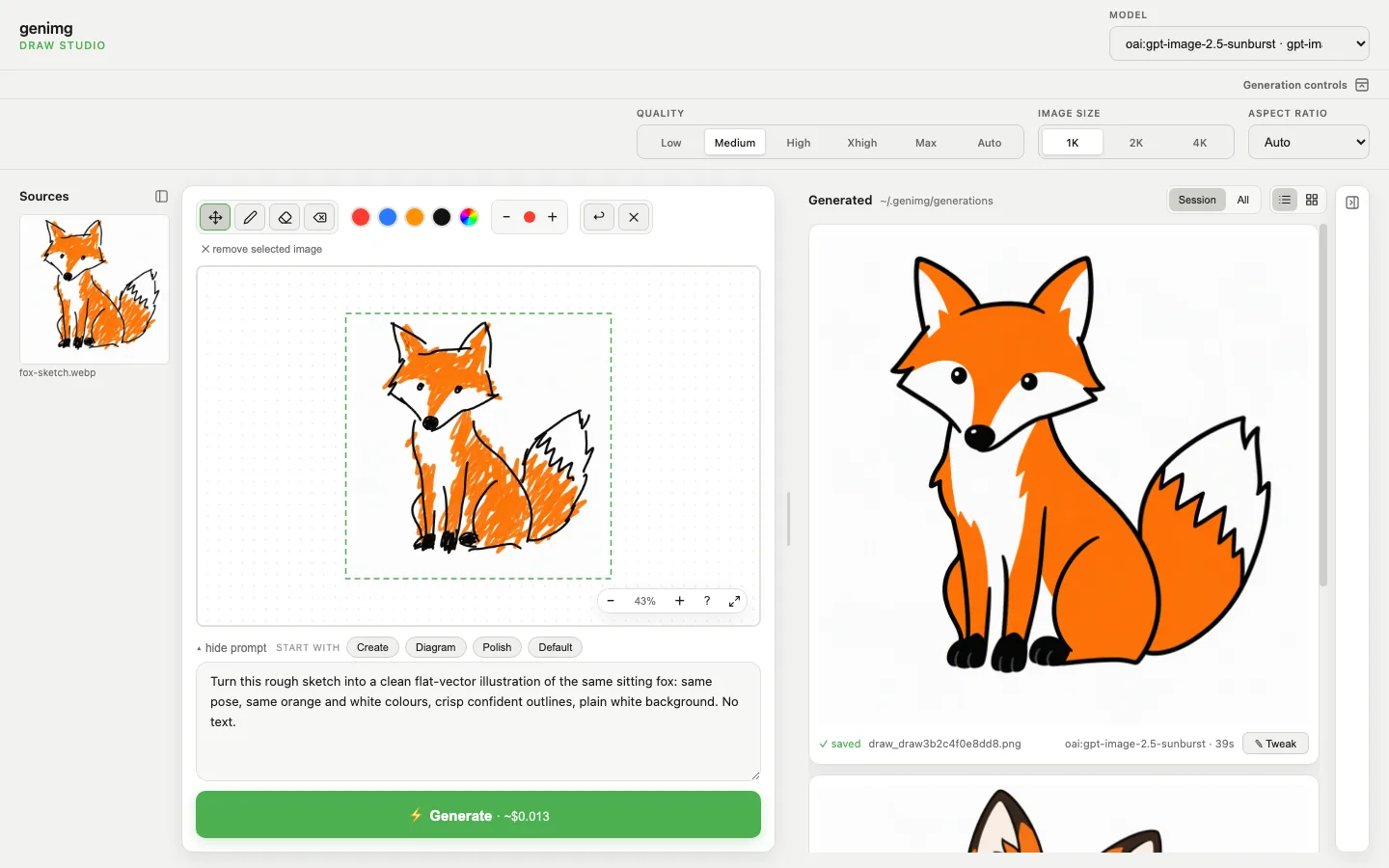
- Click a source image to put it on the canvas, or draw on a blank one.
- Mark what you want and describe it in the prompt.
-
Generate sends the canvas to the model. Put the result back on the canvas for another pass.
-
Results save to
~/.genimg/generations/; All lists earlier ones. - codex:image draws on your Codex subscription, no API key.
--no-openprints the URL instead of opening a browser.
Draw from an iPad
- Draw with a finger or Apple Pencil while the Studio runs on your Mac.
| Method | Requires | Pros | Cons |
|---|---|---|---|
| Sidecar | Mac and iPad on one Apple Account, within 10 m | Apple Pencil, nothing to install, the Studio stays on localhost |
The iPad shows the Mac's screen; the Studio ignores pressure |
| Tailscale | Mac and iPad on the same tailnet | Works away from home; only your tailnet can reach it | Needs Tailscale on both |
| Same network | Mac and iPad on one network, such as home Wi-Fi | Nothing to install | Anyone on that network can reach it. Trusted home networks only |
genimg draw                                     # Sidecar
genimg draw --host "$(tailscale ip -4)"         # Tailscale
genimg draw --host "$(ipconfig getifaddr en0)"  # same network
With Sidecar, drag the browser window onto the iPad. With --host, open the printed URL in Safari
on the iPad; there is no login, so press Ctrl-C when you finish.
Draw Studio or the CLI?
| Need | Draw Studio | CLI |
|---|---|---|
| Sketch or annotate | ✅ | Pass a file with --input |
| Several variants | One per Generate | --num |
| Deliberate diversity | ❌ | --diverse, --deltas |
| Review grid | Generated panel | --grid, genimg grid |
Security boundary
- By default only this computer can reach the Studio.
- With
--host, anyone who can reach the address can generate, list your generation history, and open those images and the ones you loaded. There is no login. - Your provider keys never reach the page.
- The provider receives your prompt and canvas.
The server binds to 127.0.0.1 or the one --host address. It refuses 0.0.0.0, a Host header
naming anything but a loopback name or that address, and cross-site POSTs.